I’m a designer and low-code enthusiast who recently decided to try vibe coding with Codex for the first time.
The reason was simple. I love learning new things, and lately AI-assisted coding has been everywhere. At some point, I realized it was time to stop just reading about it and actually try Codex myself.
Since I work in design and low-code environments, I’m comfortable creating app concepts in Figma and I understand the basics of CSS, HTML, and a bit of JavaScript. So the first question wasn’t whether I could build something, but what I should build. I wanted something meaningful, but not overly complicated.

The First Idea... and a Quick Reality Check
Back when photography was a big part of my life, I had an idea for an app designed specifically for photographers. I even had parts of it already designed in Figma, so it felt like the perfect project to test vibe coding on.
I gave the AI a few basic instructions, and suddenly things started happening that genuinely surprised me. The result was impressive. At that moment, I realized this could actually work and that vibe coding has serious potential.
At the same time, I also realized that the photography app didn’t really solve a meaningful problem for me personally. So naturally, a new idea came along.
A Smart Recipe Management App
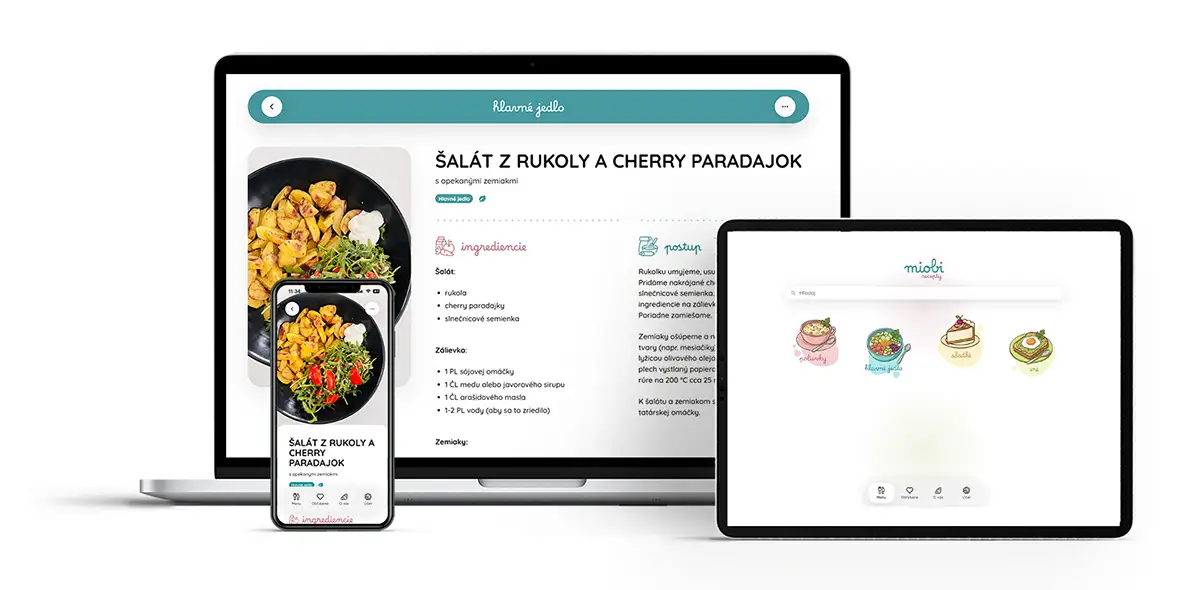
I needed a project with a clear problem, a specific user, and enough simplicity to make it manageable as my first real Codex experiment. That’s how I ended up building a recipe app.
My wife has a lot of vegetarian recipes, but they were scattered everywhere: papers, screenshots, messages, random notes. Whenever she wanted to cook something, the challenge often wasn’t the cooking itself, but finding the recipe in the first place.
And then I realized this is actually a very common problem. A lot of people want to cook more vegetarian meals, but they don’t know where to start, what to combine, or how to keep recipes organized in one place.
That’s when the app started making real sense. It wasn’t just a digital recipe list anymore, but a simple tool that could organize content, simplify decision-making, and make recipes easy to share with others.
Design as the First Step
The first phase was obvious – designing the app.
In Figma, I prepared:
- a home screen with 4 categories,
- a recipe list,
- a recipe detail page.
Sections like favorites, about, and settings were left for later because they weren’t critical for the first version.
I won’t go too deep into the design process since this article is more about building the app itself, but visually I wanted the interface to feel modern and inspired by the latest iOS design language.
For the home screen, I needed four category illustrations. Even though my wife is an illustrator, we decided to experiment with AI-generated visuals using Gemini, which I later refined in Illustrator.
For the “About” section, I also tested a local AI model called Flux using Stability Matrix and ComfyUI, turning a source photo into a Pixar-style visual. For me, it was an interesting experiment showing how AI can support not only development, but visual content creation as well.


Why Codex?
Naturally, the first question was: which AI should I use for coding?
Claude is currently very strong, but since a lot of people already use GPT, I decided to go with Codex by OpenAI. One advantage was that it’s included within GPT, and the credits are separated, so I didn’t need to purchase anything extra during the project.
Starting Development
I created a new project, selected a folder, and a standard chat interface opened up.
The prompt was simple:
- I want a PWA app (primarily mobile-first),
- it should be a recipe management app,
- a home screen with 4 categories,
- a recipe list and recipe detail,
- an admin interface for adding and editing recipes.
For every screen, I also attached a Figma design link. That was it. Codex immediately started generating the project.
It suggested two approaches:
- a simpler solution using Vanilla JS,
- a more scalable solution using React + Vite + TypeScript.
As a designer, I wasn’t fully confident about which path to choose. A developer colleague helped me here and recommended React, mainly because it makes more sense if the app grows over time and gains more features.

Why PWA?
The decision to go with a PWA was quick and practical.
- I didn’t have to deal with App Store or Google Play distribution,
- no developer account fees,
- the app works across all platforms (mobile, tablet, desktop),
- users can install it like a native app,
- it works offline or with limited internet access,
- and it supports push notifications.
For a Codex experiment, it felt like the fastest and most practical way to get a usable product running without unnecessary deployment complexity.
Iteration: The Reality of Working with Codex
The first output was surprisingly good.
Codex understood typography, layout, shadows, blur effects, and the overall visual direction directly from Figma. Of course, many things weren’t perfect – logos, images, spacing, details, but it was more than enough as a starting point.
From there, I gradually refined the app:
- through prompts like “make this smaller,” “center this,” or “add this,”
- or directly in CSS.
Once I hit Figma’s free-plan limitations, I started sending screenshots instead. Codex had no problem understanding them and adjusting the design accordingly.
Step by step, I improved:
- sizes, colors, and animations,
- vegan and vegetarian categories,
- filtering and sorting options.
The recipe detail page was especially important to me:
- a large image with a parallax effect,
- ingredients,
- cooking instructions.
Initially, Codex designed ingredients as “one row = one item.” Technically it worked, but I needed more flexibility. So I modified the admin editor to support formatting like bold text and bullet points.



The Hardest Part: Getting the App Online
Until this point, everything was running locally on my computer. But if the app was going to have any real value, it needed to go online — ideally for free, since this was still an experimental project.
That’s where the biggest challenge began.
At first, I tried Firebase + Netlify, but I quickly ran into limitations. After multiple deploys, Netlify even temporarily blocked my project.
Eventually, I settled on:
- Firebase – database and backend,
- Cloudinary – image management and optimization,
- Cloudflare – frontend hosting.
The hardest part wasn’t the code itself, but integrating everything together:
- API keys,
- authentication,
- service configuration.
Codex guided me step by step and explained where everything needed to be configured. Even so, this became the most manual part of the entire project.
The Final Touch: Push Notifications
Push notifications weren’t essential for the first version, but since this was a PWA, testing them felt like the logical next step.
The workflow is simple:
- I add a new recipe through the admin interface,
- enable notifications,
- users who allowed notifications receive an alert.
Codex struggled with this part a bit more, but eventually managed to make it work. We also had to deal with security concerns to make sure notifications couldn’t be abused by third parties.
Final Thoughts
Overall, I see my first vibe coding experience as a very positive one.
Development took around two weeks, which might sound like a lot, but a significant portion of that time was spent changing requirements, testing ideas, and learning along the way.
What surprised me the most was how many things Codex could figure out on its own. It designed entire parts of the app, including the admin interface and often added thoughtful details I wouldn’t have considered myself.
In the end, the biggest challenge wasn’t coding. It was integrations and connecting services together. That’s where it became clear that even though AI dramatically speeds up development, you still need context, judgment, and decision-making skills.
Looking back, I think the project I chose was ideal for exploring vibe coding – not too simple, but not overwhelmingly complex either. With larger projects, I can imagine things becoming significantly more difficult, maybe even discouraging for beginners.
One thing is clear, though: AI models are improving every day, pushing vibe coding further and making it increasingly accessible.
Experimenting with vibe coding convinced me of one thing:
Turning an idea into a real product has never been easier.
But understanding the context, thinking critically, and knowing what you actually want to build still matters more than ever.